

Legal Notice
Imprint
Information requirement according to §5 E-Commerce Act, §14 Commercial Code, §63 Trade Regulation Act and disclosure obligation according to §25 Media Act.
Le Ciel Vintage
Business purpose: Trade
E-mail: mavula-mouthfuloflove@outlook.com
Member of: Austrian Economic Chambers
Professional law: www.gisa.gv.at/abfrage
Supervisory Authority/Trade Authority: Municipal Authority of the City of Linz
Job title: Trade business
State of conferral: Austria
Source: Created with the Imprint Generator from firmenwebseiten.at
Copyright notice
All contents of this website (images, photos, texts, videos) are subject to copyright. If necessary, we will legally pursue the unauthorized use of parts of the contents of our site.
EU Dispute Resolution
In accordance with the Regulation on Online Dispute Resolution in Consumer Matters (ODR Regulation), we would like to inform you about the online dispute resolution platform (OS platform).
Consumers have the possibility to submit complaints to the European Commission's online dispute resolution platform at http://ec.europa.eu/odr?tid=221143704. The contact details required for this can be found above in our imprint.
However, we would like to point out that we are neither willing nor obliged to participate in dispute resolution proceedings before a consumer arbitration board.
Liability for contents of this website
We are constantly developing the contents of this website and make every effort to provide correct and up-to-date information. Unfortunately, we cannot accept any liability for the correctness of all content on this website, especially for that provided by third parties.
If you notice any problematic or illegal content, please contact us immediately; you will find the contact details in the imprint.
Liability for links on this website
Our website contains links to other websites for whose content we are not responsible. Liability for linked websites does not exist for us according to § 17 ECG, as we had and have no knowledge of illegal activities, such illegalities have not been noticed by us so far and we would remove links immediately if we become aware of illegalities.
If you notice illegal links on our website, please contact us; you will find the contact details in the imprint.
Photo credit
The images, photos and graphics on this website are protected by copyright.
The image rights lie with the following photographers and companies:
- Photographer Mustermann
Privacy Policy
Cookies
Our website uses HTTP cookies to store user-specific data.
Below we explain what cookies are and why they are used so that you can better understand the following privacy policy.
What exactly are cookies?
Whenever you browse the internet, you use a browser. Well-known browsers are, for example, Chrome, Safari, Firefox, Internet Explorer and Microsoft Edge. Most websites store small text files in your browser. These files are called cookies.
One thing cannot be denied: cookies are really useful little helpers. Almost all websites use cookies. To be more precise, these are HTTP cookies, as there are other cookies for other areas of application. HTTP cookies are small files that are stored on your computer by our website. These cookie files are automatically placed in the cookie folder, effectively the "brain" of your browser. A cookie consists of a name and a value. When defining a cookie, one or more attributes must also be specified.
Cookies store certain user data from you, such as language or personal page settings. When you visit our site again, your browser transmits the "user-related" information back to our site. Thanks to cookies, our website knows who you are and offers you the settings you are used to. In some browsers, every cookie has its own file; in others, such as Firefox, all cookies are stored in a single file.
There are both first-party cookies and third-party cookies. First-party cookies are created directly by our site, third-party cookies are created by partner websites (e.g., Google Analytics). Every cookie is to be evaluated individually, as every cookie stores different data. The expiration time of a cookie also varies from a few minutes to a few years. Cookies are not software programs and do not contain viruses, Trojans or other "pests". Cookies also cannot access information on your PC.
Cookie data can look like this, for example:
Name: _ga
Value: GA1.2.1326744211.152221143704-6
Purpose: Distinguishing website visitors
Expiration date: after 2 years
A browser should be able to support these minimum sizes:
- At least 4096 bytes per cookie
- At least 50 cookies per domain
- At least 3000 cookies in total
What types of cookies are there?
The question of which cookies we use specifically depends on the services used and is clarified in the following sections of the privacy policy. At this point, we would like to briefly discuss the different types of HTTP cookies.
One can distinguish between 4 types of cookies:
Essential cookies
These cookies are necessary to ensure basic website functions. For example, these cookies are needed if a user puts a product in the shopping cart, continues surfing on other pages and only goes to the checkout later. Through these cookies, the shopping cart is not deleted even if the user closes their browser window.
Functional cookies
These cookies collect information about user behavior and whether the user receives any error messages. In addition, these cookies are used to measure the loading time and the behavior of the website in different browsers.
Target-oriented cookies
These cookies provide better user-friendliness. For example, entered locations, font sizes or form data are saved.
Advertising cookies
These cookies are also called targeting cookies. They serve to provide the user with individually adapted advertising. This can be very practical, but also very annoying.
Usually, when you visit a website for the first time, you are asked which of these types of cookies you want to allow. And of course, this decision is also stored in a cookie.
How can I delete cookies?
You decide yourself how and whether you want to use cookies. Regardless of which service or website the cookies come from, you always have the possibility to delete, deactivate or only partially allow cookies. For example, you can block third-party cookies but allow all other cookies.
If you want to find out which cookies have been stored in your browser, or if you want to change or delete cookie settings, you can find this in your browser settings:
Chrome: Delete, enable and manage cookies in Chrome
Safari: Manage cookies and website data with Safari
Firefox: Delete cookies to remove data that websites have placed on your computer
Internet Explorer: Delete and manage cookies
Microsoft Edge: Delete and manage cookies
If you generally do not want cookies, you can set your browser so that it always informs you when a cookie is to be set. This way, you can decide for each individual cookie whether you allow the cookie or not. The procedure is different depending on the browser. It is best to search for the instructions in Google with the search term "delete cookies Chrome" or "deactivate cookies Chrome" in the case of a Chrome browser.
What about my data protection?
The so-called "cookie guidelines" have been in place since 2009. They state that the storage of cookies requires your consent. Within the EU countries, however, there are still very different reactions to these guidelines. In Austria, however, this guideline was implemented in § 96 Para. 3 of the Telecommunications Act (TKG).
If you would like to know more about cookies and are not afraid of technical documentation, we recommend https://tools.ietf.org/html/rfc6265, the Request for Comments from the Internet Engineering Task Force (IETF) called "HTTP State Management Mechanism".
Storage of personal data
Personal data that you electronically transmit to us on this website, such as name, e-mail address, address or other personal details in the context of submitting a form or comments in the blog, are used by us together with the time and IP address only for the purpose stated, securely stored and not passed on to third parties.
We therefore only use your personal data for communication with those visitors who expressly wish to be contacted and for the processing of the services and products offered on this website. We do not pass on your personal data without consent, but we cannot rule out that this data may be viewed in the event of illegal behavior.
If you send us personal data via e-mail – i.e., outside of this website – we cannot guarantee secure transmission and the protection of your data. We recommend that you never send confidential data unencrypted via e-mail.
Evaluation of visitor behavior
In the following privacy policy, we inform you whether and how we evaluate data from your visit to this website. The evaluation of the collected data is generally anonymous, and we cannot draw conclusions about your person from your behavior on this website.
You can find out more about how to object to these evaluations of visit data in the following privacy policy.
Google Maps Privacy Policy
We use Google Maps from Google Inc. on our website. For the European area, the company Google Ireland Limited (Gordon House, Barrow Street Dublin 4, Ireland) is responsible for all Google services. With Google Maps, we can show you locations better and thus adapt our service to your needs. By using Google Maps, data is transmitted to Google and stored on Google servers. Here we want to go into more detail about what Google Maps is, why we use this Google service, what data is stored and how you can prevent this.
What is Google Maps?
Google Maps is an internet map service from Google. With Google Maps, you can search online via a PC, tablet or app for exact locations of cities, sights, accommodations or companies. If companies are represented on Google My Business, further information about the company is displayed in addition to the location. To show how to get there, map sections of a location can be embedded in a website using HTML code. Google Maps shows the earth's surface as a road map or as an aerial or satellite image. Thanks to the Street View images and high-quality satellite images, very precise representations are possible.
Why do we use Google Maps on our website?
All our efforts on this site pursue the goal of offering you a useful and meaningful time on our website. By embedding Google Maps, we can provide you with the most important information on various locations. You can see at a glance where our company headquarters are located. The directions always show you the best or fastest way to us. You can retrieve the route for trips by car, public transport, on foot or by bicycle. For us, the provision of Google Maps is part of our customer service.
What data is stored by Google Maps?
In order for Google Maps to offer its service fully, the company must collect and store data from you. This includes, among other things, the search terms entered, your IP address and also the latitude and longitude coordinates. If you use the route planner function, the entered starting address is also saved. However, this data storage happens on the websites of Google Maps. We can only inform you about this, but have no influence. Since we have embedded Google Maps on our website, Google sets at least one cookie (Name: NID) in your browser. This cookie stores data about your user behavior. Google uses this data primarily to optimize its own services and to provide individual, personalized advertising for you.
The following cookie is set in your browser due to the integration of Google Maps:
Name: NID
Value: 188=h26c1Ktha7fCQTx8rXgLyATyITJ221143704-5
Purpose: NID is used by Google to adapt advertisements to your Google search. With the help of the cookie, Google "remembers" your most frequently entered search queries or your previous interaction with ads. This way you always get customized ads. The cookie contains a unique ID that Google uses to collect your personal settings for advertising purposes.
Expiration date: after 6 months
Note: We cannot guarantee completeness in the information on stored data. Especially when using cookies, changes can never be ruled out. To identify the NID cookie, a separate test page was created where only Google Maps was embedded.
How long and where is the data stored?
Google's servers are located in data centers all over the world. However, most servers are located in America. For this reason, your data is increasingly stored in the USA. You can read exactly where the Google data centers are located here: https://www.google.com/about/datacenters/inside/locations/?hl=de
Google distributes data across various storage media. This makes the data faster to access and better protected against potential tampering attempts. Each data center also has special emergency programs. For example, if there are problems with Google hardware or a natural disaster disables the servers, the data remains largely protected anyway.
Google stores some data for a fixed period. For other data, Google merely offers the option to delete it manually. Furthermore, the company also anonymizes information (such as advertising data) in server logs by deleting part of the IP address and cookie information after 9 or 18 months.
How can I delete my data or prevent data storage?
With the automatic deletion function for location and activity data introduced in 2019, information on location tracking and web/app activity is stored for either 3 or 18 months—depending on your choice—and then deleted. In addition, you can manually delete this data from your history via your Google account at any time. If you want to prevent your location tracking completely, you must pause the “Web & App Activity” section in your Google account. Click “Data & personalization” and then the “Activity controls” option. Here you can turn activities on or off.
Furthermore, you can deactivate, delete, or manage individual cookies in your browser. Depending on which browser you use, this always works a little differently. The following instructions show you how to manage cookies in your browser:
Chrome: Clear, enable, and manage cookies in Chrome
Safari: Manage cookies and website data with Safari
Firefox: Clear cookies and site data in Firefox
Internet Explorer: Delete and manage cookies
Microsoft Edge: Delete and manage cookies
If you generally do not want any cookies, you can set your browser so that it always informs you when a cookie is to be set. This way, you can decide for each individual cookie whether to allow it or not.
Google is an active participant in the EU-U.S. Privacy Shield Framework, which regulates the correct and secure transfer of personal data. You can find more information on this at https://www.privacyshield.gov/participant?id=a2zt000000001L5AAI. If you want to learn more about Google's data processing, we recommend the company's own privacy policy at https://policies.google.com/privacy?hl=de.
Google Fonts Privacy Policy
We use Google Fonts on our website. These are the "Google fonts" from the company Google Inc. For the European area, the company Google Ireland Limited (Gordon House, Barrow Street Dublin 4, Ireland) is responsible for all Google services.
You do not need to register or provide a password to use Google fonts. Furthermore, no cookies are stored in your browser. The files (CSS, fonts) are requested via the Google domains fonts.googleapis.com and fonts.gstatic.com. According to Google, requests for CSS and fonts are completely separate from all other Google services. If you have a Google account, you do not need to worry that your Google account data will be transmitted to Google while using Google Fonts. Google records the use of CSS (Cascading Style Sheets) and the fonts used and stores this data securely. We will take a detailed look at exactly what this data storage looks like.
What are Google Fonts?
Google Fonts (formerly Google Web Fonts) is a directory of over 800 fonts that Google makes available to its users for free.
Many of these fonts are published under the SIL Open Font License, while others were published under the Apache License. Both are free software licenses.
Why do we use Google Fonts on our website?
With Google Fonts, we can use fonts on our own website without having to upload them to our own server. Google Fonts is an important component for maintaining the quality of our website. All Google fonts are automatically optimized for the web, which saves data volume and is a major advantage, especially for use on mobile devices. When you visit our site, the low file size ensures a fast loading time. Furthermore, Google Fonts are secure web fonts. Different rendering systems in various browsers, operating systems, and mobile devices can lead to errors. Such errors can partially distort the appearance of texts or entire websites. Thanks to the fast Content Delivery Network (CDN), there are no cross-platform issues with Google Fonts. Google Fonts supports all common browsers (Google Chrome, Mozilla Firefox, Apple Safari, Opera) and works reliably on most modern mobile operating systems, including Android 2.2+ and iOS 4.2+ (iPhone, iPad, iPod). We use Google Fonts so that we can present our entire online service as beautifully and consistently as possible.
What data is stored by Google?
When you visit our website, the fonts are reloaded via a Google server. This external call transmits data to Google's servers. This is how Google recognizes that you or your IP address has visited our website. The Google Fonts API was developed to reduce the use, storage, and collection of end-user data to what is necessary for the proper provision of fonts. By the way, API stands for “Application Programming Interface” and serves, among other things, as a data transmitter in the software sector.
Google Fonts stores CSS and font requests securely at Google and is therefore protected. Through the collected usage figures, Google can determine how popular individual fonts are. Google publishes the results on internal analysis pages, such as Google Analytics. In addition, Google also uses data from its own web crawler to determine which websites use Google fonts. This data is published in Google Fonts’ BigQuery database. Entrepreneurs and developers use the Google web service BigQuery to be able to analyze and move large amounts of data.
However, it should also be noted that information such as language settings, IP address, browser version, browser screen resolution, and browser name are automatically transmitted to Google's servers with every Google Font request. Whether this data is also stored is not clearly determinable or is not clearly communicated by Google.
How long and where is the data stored?
Google stores requests for CSS assets on its servers, which are primarily located outside the EU, for one day. This allows us to use the fonts with the help of a Google stylesheet. A stylesheet is a template used to easily and quickly change, for example, the design or font of a website.
The font files are stored by Google for one year. Google's goal is to fundamentally improve the loading time of websites. If millions of websites link to the same fonts, they are cached after the first visit and immediately appear on all other subsequently visited websites. Sometimes Google updates font files to reduce file size, increase language coverage, and improve design.
How can I delete my data or prevent data storage?
The data that Google stores for one day or one year cannot simply be deleted. The data is automatically transmitted to Google when the page is called up. To be able to delete this data prematurely, you must contact Google Support at https://support.google.com/?hl=de&tid=221143704. In this case, you only prevent data storage if you do not visit our site.
Unlike other web fonts, Google allows us unrestricted access to all fonts. We can therefore access an ocean of fonts without limitation and thus get the best out of our website. You can find more about Google Fonts and further questions at https://developers.google.com/fonts/faq?tid=221143704. Although Google addresses data protection-related matters there, it does not contain truly detailed information about data storage. It is relatively difficult to get truly precise information from Google about stored data.
You can also read what data is fundamentally collected by Google and what this data is used for at https://www.google.com/intl/de/policies/privacy/.
Google Fonts Local Privacy Policy
On our website, we use Google Fonts from the company Google Inc. For the European area, the company Google Ireland Limited (Gordon House, Barrow Street Dublin 4, Ireland) is responsible. We have integrated the Google fonts locally, i.e., on our web server—not on Google's servers. As a result, there is no connection to Google servers and therefore no data transmission or storage.
What are Google Fonts?
Google Fonts used to be called Google Web Fonts. This is an interactive directory with over 800 fonts that Google provides for free. With Google Fonts, one could use fonts without uploading them to one's own server. But in order to prevent any information transmission to Google servers in this regard, we have downloaded the fonts to our server. In this way, we act in accordance with data protection regulations and do not pass any data on to Google Fonts.
Unlike other web fonts, Google allows us unrestricted access to all fonts. We can therefore access an ocean of fonts without limitation and thus get the best out of our website. You can find more about Google Fonts and further questions at https://developers.google.com/fonts/faq?tid=221143704.
Data Protection
We have drafted this privacy policy (version 25.03.2021-221143704) in order to explain to you in accordance with the requirements of the General Data Protection Regulation (EU) 2016/679 what information we collect, how we use data, and what choices you have as a visitor to this website.
Privacy policies usually sound very technical. This version, however, is intended to describe the most important things for you as simply and clearly as possible. As far as possible, technical terms are explained in a reader-friendly manner. We also want to convey that we only collect and use information on this website if there is a corresponding legal basis. That is certainly not possible if one provides the briefest, most technical explanations possible, as is often standard on the Internet when it comes to data protection. I hope you find the following explanations interesting and informative, and perhaps there is one piece of information or another that you did not know yet.
If questions remain, we would like to ask you to follow the available links and view further information on third-party sites, or simply write us an email. You can find our contact details in the legal notice.
Automatic Data Storage
When you visit websites today, certain information is automatically created and stored, including on this website. These collected data should be collected as sparingly as possible and only with justification. By website, we mean the entirety of all web pages on your domain, i.e., everything from the home page to the very last subpage (like this one). By domain, we mean, for example, example.com or samplewebsite.org.
Even while you are currently visiting our website, our web server—that is, the computer on which this website is stored—generally automatically stores data such as the following for reasons of operational security, for creating access statistics, etc.:
- the complete internet address (URL) of the website accessed (e.g., https://www.examplewebsite.de/example-subpage.html/)
- browser and browser version (e.g., Chrome 87)
- the operating system used (e.g., Windows 10)
- the address (URL) of the previously visited page (referrer URL) (e.g., https://www.examplesource.de/wheredidicomfrom.html/)
- the hostname and IP address of the device from which access is taking place (e.g., COMPUTERNAME and 194.23.43.121)
- date and time
- in files, so-called web server log files.
For illustration:
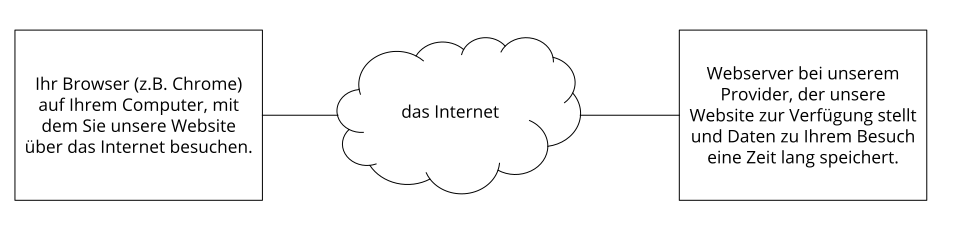
As a rule, these files are stored for two weeks and then automatically deleted. We do not pass this data on, but we cannot rule out that this data may be viewed by authorities in the event of illegal behavior.
In short: Your visit is logged by our provider (the company that runs our website on special computers (servers)), but we do not pass your data on!
OpenStreetMap Privacy Policy
We have integrated map sections of the online map tool "OpenStreetMap" on our website. This is what is known as Open Source Mapping, which we can retrieve via an API (interface). This feature is offered by the OpenStreetMap Foundation, St John’s Innovation Centre, Cowley Road, Cambridge, CB4 0WS, United Kingdom. By using this map feature, your IP address is forwarded to OpenStreetMap. In this privacy policy, you will learn why we use features of the OpenStreetMap tool, where data is stored, and how you can prevent this data storage.
What is OpenStreetMap?
The OpenStreetMap project was launched in 2004. The goal of the project is and was to create a free world map. Users worldwide collect data about buildings, forests, rivers, and streets, among other things. Over the years, this has resulted in an extensive digital world map created by the users themselves. Naturally, the map is not complete, but it is equipped with a great deal of data in most regions.
Why do we use OpenStreetMap on our website?
Our website is primarily intended to be helpful to you. From our perspective, that means being able to find information quickly and easily. This is, of course, about our services and products on one hand, but it also means that other helpful information should be available to you. That is why we use the map service OpenStreetMap. This allows us, for example, to show you exactly how to find our company. The map shows you the best way to get to us and makes your journey a breeze.
What data is stored by OpenStreetMap?
When you visit one of our webpages that offers OpenStreetMap, user data is transmitted to the service and stored there. OpenStreetMap collects information such as your interactions with the digital map, your IP address, data about your browser, device type, operating system, and the date and time you used the service. Tracking software is also used for this purpose to record user interactions. In its own privacy policy, the company lists the analysis tool “Piwik.”
The data collected is subsequently accessible to the relevant working groups of the OpenStreetMap Foundation. According to the company, personal data is not passed on to other individuals or companies unless legally necessary. While the third-party provider Piwik does store your IP address, it does so in an abbreviated form.
The following cookie may be set in your browser if you interact with OpenStreetMap on our website:
Name: _osm_location
Value: 9.63312%7C52.41500%7C17%7CM
Purpose: This cookie is required to unlock the contents of OpenStreetMap.
Expiry date: after 10 years
If you wish to view the full-screen map, you will be linked to the OpenStreetMap website. There, the following cookies, among others, may be stored in your browser:
Name: _osm_totp_token
Value: 148253221143704-2
Purpose: This cookie is used to ensure the operation of the map section.
Expiry date: after one hour
Name: _osm_session
Value: 1d9bfa122e0259d5f6db4cb8ef653a1c
Purpose: This cookie helps store session information (i.e., user behavior).
Expiry date: after session ends
Name: _pk_id.1.cf09
Value: 4a5.1593684142.2.1593688396.1593688396221143704-9
Purpose: This cookie is set by Piwik to store or measure user data such as click behavior.
Expiry date: after one year
How long and where is the data stored?
The API servers, databases, and servers for auxiliary services are currently located in the United Kingdom (Great Britain and Northern Ireland) and in the Netherlands. Your IP address and user information, which are stored in abbreviated form by the web analysis tool Piwik, are deleted after 180 days.
How can I delete my data or prevent data storage?
You have the right to access your personal data at any time and to object to its use and processing. You can manage, delete, or disable cookies that may be set by OpenStreetMap in your browser at any time. However, this will mean that the service will no longer function to its full extent. Managing, deleting, or disabling cookies works slightly differently in every browser. Below, you will find links to instructions for the most popular browsers:
Chrome: Clear, enable and manage cookies in Chrome
Safari: Manage cookies and website data in Safari
Firefox: Clear cookies and site data in Firefox
Internet Explorer: Delete and manage cookies
Microsoft Edge: Delete and manage cookies
If you would like to learn more about data processing by OpenStreetMap, we recommend the company's privacy policy at https://wiki.osmfoundation.org/wiki/Privacy_Policy.
Rights under the General Data Protection Regulation
According to the provisions of the GDPR, you are fundamentally entitled to the following rights:
- Right to rectification (Article 16 GDPR)
- Right to erasure (“right to be forgotten”) (Article 17 GDPR)
- Right to restriction of processing (Article 18 GDPR)
- Right to notification – obligation to notify in connection with the rectification or erasure of personal data or restriction of processing (Article 19 GDPR)
- Right to data portability (Article 20 GDPR)
- Right to object (Article 21 GDPR)
- Right not to be subject to a decision based solely on automated processing, including profiling (Article 22 GDPR)
If you believe that the processing of your data violates data protection law or your data protection claims have otherwise been violated in any way, you can lodge a complaint with the supervisory authority. In Austria, this is the Data Protection Authority (Datenschutzbehörde), the website of which can be found at https://www.dsb.gv.at/, and for Germany, you can contact the Federal Commissioner for Data Protection and Freedom of Information (BfDI).
TLS encryption with https
TLS, encryption, and https sound very technical, and they are. We use HTTPS (Hypertext Transfer Protocol Secure, which stands for “secure hypertext transfer protocol”) to transfer data across the internet in a way that is protected from eavesdropping.
This means that the entire transmission of all data from your browser to our web server is secured – no one can “listen in.”
By doing this, we have introduced an additional layer of security and fulfill data protection through technical design (Article 25, paragraph 1 GDPR). Through the use of TLS (Transport Layer Security), an encryption protocol for secure data transmission on the internet, we can ensure the protection of confidential data.
You can recognize the use of this data transmission security by the small lock symbol  in the top left of the browser to the left of the internet address (e.g., beispielseite.de) and the use of the https scheme (instead of http) as part of our internet address.
If you would like to know more about the topic of encryption, we recommend a Google search for “Hypertext Transfer Protocol Secure wiki” to get good links to further information.
Google Analytics Privacy Policy
On our website, we use the analysis tracking tool Google Analytics (GA) from the American company Google Inc. For the European region, the company Google Ireland Limited (Gordon House, Barrow Street Dublin 4, Ireland) is responsible for all Google services. Google Analytics collects data about your actions on our website. For example, if you click a link, this action is stored in a cookie and sent to Google Analytics. With the help of the reports we receive from Google Analytics, we can better adapt our website and our service to your wishes. Below, we go into more detail about the tracking tool and inform you primarily about what data is stored and how you can prevent it.
What is Google Analytics?
Google Analytics is a tracking tool used for traffic analysis on our website. For Google Analytics to work, a tracking code is embedded into the code of our website. When you visit our website, this code records various actions you perform on our website. As soon as you leave our website, this data is sent to the Google Analytics servers and stored there.
Google processes the data and we receive reports about your user behavior. These can include, among others, the following reports:
- Audience reports: Through audience reports, we get to know our users better and know more precisely who is interested in our service.
- Advertising reports: With advertising reports, we can analyze and improve our online advertising more easily.
- Acquisition reports: Acquisition reports give us helpful information about how we can inspire more people to use our service.
- Behavior reports: Here we find out how you interact with our website. We can understand the path you take on our site and which links you click.
- Conversion reports: A conversion is a process in which you carry out a desired action based on a marketing message. For example, when you go from being just a website visitor to a buyer or newsletter subscriber. With the help of these reports, we learn more about how our marketing measures are received by you. This is how we aim to increase our conversion rate.
- Real-time reports: Here we can always know immediately what is happening on our website right now. For example, we see how many users are currently reading this text.
Why do we use Google Analytics on our website?
Our goal with this website is clear: We want to offer you the best possible service. The statistics and data from Google Analytics help us achieve this goal.
The statistically evaluated data shows us a clear picture of the strengths and weaknesses of our website. On one hand, we can optimize our site so that it is more easily found by interested people on Google. On the other hand, the data helps us to better understand you as a visitor. We therefore know very accurately what we need to improve on our website in order to offer you the best possible service. The data also serves us in conducting our advertising and marketing measures more individually and cost-effectively. After all, it only makes sense to show our products and services to people who are interested in them.
What data is stored by Google Analytics?
Google Analytics creates a random, unique ID using a tracking code, which is connected to your browser cookie. This is how Google Analytics recognizes you as a new user. When you visit our site the next time, you will be recognized as a “returning” user. All collected data is stored together with this user ID. This is what makes it possible to evaluate pseudonymous user profiles in the first place.
In order to analyze our website with Google Analytics, a property ID must be inserted into the tracking code. The data is then stored in the corresponding property. For every newly created property, the Google Analytics 4 property is the default. Alternatively, one can also still create a Universal Analytics property. Depending on the property used, data is stored for different lengths of time.
Through markers such as cookies and app instance IDs, your interactions on our website are measured. Interactions are all types of actions that you perform on our website. If you also use other Google systems (such as a Google account), data generated via Google Analytics can be linked with third-party cookies. Google does not share Google Analytics data unless we, as the website operator, authorize it. Exceptions may occur if it is legally required.
The following cookies are used by Google Analytics:
Name: _ga
Value: 2.1326744211.152221143704-5
Purpose: By default, analytics.js uses the _ga cookie to store the user ID. Basically, it serves to distinguish website visitors.
Expiry date: after 2 years
Name: _gid
Value: 2.1687193234.152221143704-1
Purpose: This cookie is also used to distinguish website visitors.
Expiry date: after 24 hours
Name: _gat_gtag_UA_<property-id>
Value: 1
Purpose: Used to lower the request rate. If Google Analytics is deployed via the Google Tag Manager, this cookie is named _dc_gtm_ <property-id>.
Expiry date: after 1 minute
Name: AMP_TOKEN
Value: none specified
Purpose: The cookie has a token with which a user ID can be retrieved from the AMP client ID service. Other possible values indicate a sign-out, a request, or an error.
Expiry date: after 30 seconds to one year
Name: __utma
Value: 1564498958.1564498958.1564498958.1
Purpose: This cookie allows you to track your behavior on the website and measure performance. The cookie is updated every time information is sent to Google Analytics.
Expiry date: after 2 years
Name: __utmt
Value: 1
Purpose: Like _gat_gtag_UA_<property-id>, the cookie is used for throttling the request rate.
Expiry date: after 10 minutes
Name: __utmb
Value: 3.10.1564498958
Purpose: This cookie is used to determine new sessions. It is updated every time new data or info is sent to Google Analytics.
Expiry date: after 30 minutes
Name: __utmc
Value: 167421564
Purpose: This cookie is used to set new sessions for returning visitors. It is a session cookie and is only stored until you close your browser again.
Expiry date: After closing the browser
Name: __utmz
Value: m|utmccn=(referral)|utmcmd=referral|utmcct=/
Purpose: The cookie is used to identify the source of traffic on our website. This means the cookie stores where you came from to get to our website. That could have been another page or an advertisement.
Expiry date: after 6 months
Name: __utmv
Value: not specified
Purpose: This cookie is used to store custom user data. It is updated every time information is sent to Google Analytics.
Expiry: after 2 years
Note: This list cannot claim to be exhaustive, as Google frequently changes its choice of cookies.
Here we provide an overview of the most important data collected with Google Analytics:
Heatmaps: Google creates so-called heatmaps. Heatmaps allow us to see exactly which areas you click on. This gives us information about where you are "navigating" on our site.
Session duration: Google defines session duration as the time you spend on our site without leaving it. If you have been inactive for 20 minutes, the session ends automatically.
Bounce rate: A bounce occurs when you view only one page on our website and then leave our website again.
Account creation: If you create an account or make a purchase on our website, Google Analytics collects this data.
IP address: The IP address is displayed only in shortened form so that no unique identification is possible.
Location: The IP address can be used to determine the country and your approximate location. This process is also known as IP location tracking.
Technical information: Technical information includes, among other things, your browser type, your internet service provider, or your screen resolution.
Referral source: Google Analytics and, of course, we are interested in which website or advertisement you used to come to our site.
Other data includes contact details, any reviews, media playback (e.g., if you play a video on our site), sharing content via social media, or adding items to your favorites. This list is not exhaustive and serves only as general guidance regarding data storage by Google Analytics.
How long and where is the data stored?
Google distributes its servers all over the world. Most servers are located in America, and consequently, your data is mostly stored on American servers. You can read exactly where the Google data centers are located here: https://www.google.com/about/datacenters/inside/locations/?hl=de
Your data is distributed across various physical storage media. This has the advantage that the data can be accessed faster and is better protected against manipulation. Every Google data center has appropriate emergency programs for your data. For example, if Google's hardware fails or natural disasters disable servers, the risk of a service interruption at Google remains low.
The retention period of the data depends on the properties used. When using the newer Google Analytics 4 properties, the retention period of your user data is fixed at 14 months. For other so-called event data, we have the option to choose a retention period of 2 months or 14 months.
For Universal Analytics properties, Google Analytics has a standardized retention period for your user data of 26 months. After that, your user data is deleted. However, we have the option to choose the retention period for user data ourselves. We have five options available for this:
- Deletion after 14 months
- Deletion after 26 months
- Deletion after 38 months
- Deletion after 50 months
- No automatic deletion
In addition, there is also the option that data is only deleted if you do not visit our website again within the period we have selected. In this case, the retention period is reset every time you visit our website again within the specified period.
Once the specified period has expired, the data is deleted once a month. This retention period applies to your data linked to cookies, user identification, and advertising IDs (e.g., cookies from the DoubleClick domain). Report results are based on aggregated data and are stored independently of user data. Aggregated data is a consolidation of individual data into a larger unit.
How can I delete my data or prevent data storage?
According to the data protection law of the European Union, you have the right to obtain information about your data, update it, delete it, or restrict it. Using the browser add-on to deactivate Google Analytics JavaScript (ga.js, analytics.js, dc.js), you prevent Google Analytics from using your data. You can download and install the browser add-on at https://tools.google.com/dlpage/gaoptout?hl=de. Please note that this add-on only deactivates data collection by Google Analytics.
If you generally want to deactivate, delete, or manage cookies (regardless of Google Analytics), there are separate instructions for each browser:
Chrome: Delete, enable, and manage cookies in Chrome
Safari: Manage cookies and website data with Safari
Firefox: Delete cookies to remove data that websites have stored on your computer
Internet Explorer: Delete and manage cookies
Microsoft Edge: Delete and manage cookies
Google Analytics is an active participant in the EU-U.S. Privacy Shield Framework, which regulates the correct and secure transfer of personal data. You can find more information on this at https://www.privacyshield.gov/participant?id=a2zt000000001L5AAI&tid=221143704. We hope we have been able to provide you with the most important information regarding Google Analytics data processing. If you would like to learn more about the tracking service, we recommend these two links: http://www.google.com/analytics/terms/de.html and https://support.google.com/analytics/answer/6004245?hl=de.
Google Analytics IP Anonymization
We have implemented IP address anonymization for Google Analytics on this website. This function was developed by Google to enable this website to comply with applicable data protection regulations and the recommendations of local data protection authorities when they prohibit the storage of the full IP address. The anonymization or masking of the IP takes place as soon as the IP addresses arrive at the Google Analytics data collection network and before any storage or processing of the data takes place.
More information on IP anonymization can be found at https://support.google.com/analytics/answer/2763052?hl=de.
Google Analytics Opt-out Link
By clicking on the following opt-out link, you can prevent Google from recording further visits to this website. Attention: Deleting cookies, using the incognito/private mode of your browser, or using a different browser will result in data being collected again.
Google Analytics Reports on Demographic Characteristics and Interests
We have enabled features for advertising reports in Google Analytics. The reports on demographic characteristics and interests contain information about age, gender, and interests. This allows us—without being able to assign this data to individual persons—to get a better picture of our users. You can learn more about the advertising functions at https://support.google.com/analytics/answer/3450482?hl=de_AT&utm_id=ad.
You can terminate the use of your Google Account activities and information via checkbox under "Ads Settings" at https://adssettings.google.com/authenticated.
Google Analytics Google Signals Privacy Policy
We have activated Google Signals in Google Analytics. This updates existing Google Analytics functions (advertising reports, remarketing, cross-device reports, and reports on interests and demographic characteristics) to receive aggregated and anonymized data from you, provided you have allowed personalized ads in your Google account.
What is special about this is that it involves cross-device tracking. This means your data can be analyzed across devices. By activating Google Signals, data is collected and linked to the Google account. This allows Google to recognize, for example, when you view a product on our website using a smartphone and only later buy the product via a laptop. Thanks to the activation of Google Signals, we can start cross-device remarketing campaigns that would not otherwise be possible in this form. Remarketing means that we can also show you our offer on other websites.
In Google Analytics, other visitor data such as location, search history, YouTube history, and data about your actions on our website are also collected through Google Signals. This gives us better advertising reports and more useful information about your interests and demographic characteristics from Google. This includes your age, which language you speak, where you live, or your gender. Furthermore, social criteria such as your occupation, marital status, or income are added. All these features help Google Analytics define groups of people or target groups.
The reports also help us to better assess your behavior, wishes, and interests. This allows us to optimize and adapt our services and products for you. This data expires by default after 26 months. Please note that this data collection only occurs if you have allowed personalized advertising in your Google account. This always involves aggregated and anonymous data and never data of individual persons. You can manage or delete this data in your Google account.
Google Analytics Data Processing Amendment
We have concluded a direct customer agreement with Google for the use of Google Analytics by accepting the "Data Processing Amendment" in Google Analytics.
More about the Data Processing Amendment for Google Analytics can be found here: https://support.google.com/analytics/answer/3379636?hl=de&utm_id=ad
Facebook Pixel Privacy Policy
We use the Facebook Pixel from Facebook on our website. For this purpose, we have implemented a code on our website. The Facebook Pixel is a snippet of JavaScript code that loads a collection of functions that allow Facebook to track your user actions, provided you arrived at our website via Facebook ads. If you, for example, purchase a product on our website, the Facebook Pixel is triggered and stores your actions on our website in one or more cookies. These cookies allow Facebook to match your user data (customer data such as IP address, user ID) with the data of your Facebook account. Then Facebook deletes this data again. The collected data is anonymous and not visible to us and can only be used in the context of displaying advertisements. If you are a Facebook user yourself and are logged in, your visit to our website is automatically assigned to your Facebook user account.
We only want to show our services and products to those who are genuinely interested in them. With the help of the Facebook Pixel, our advertising measures can be better tailored to your wishes and interests. This allows Facebook users (provided they have allowed personalized advertising) to see relevant ads. Furthermore, Facebook uses the collected data for analytical purposes and its own advertisements.
Below we show you those cookies that were set by integrating the Facebook Pixel on a test site. Please note that these are only example cookies. Depending on the interaction on our website, different cookies are set.
Name: _fbp
Value: fb.1.1568287647279.257405483-6221143704-7
Purpose: This cookie is used by Facebook to display advertising products.
Expiry: after 3 months
Name: fr
Value: 0aPf312HOS5Pboo2r..Bdeiuf…1.0.Bdeiuf.
Purpose: This cookie is used so that the Facebook Pixel also functions properly.
Expiry: after 3 months
Name: comment_author_50ae8267e2bdf1253ec1a5769f48e062221143704-3
Value: Author's name
Purpose: This cookie stores the text and name of a user who, for example, leaves a comment.
Expiry: after 12 months
Name: comment_author_url_50ae8267e2bdf1253ec1a5769f48e062
Value: https%3A%2F%2Fwww.testseite…%2F (author's URL)
Purpose: This cookie stores the URL of the website that the user enters in a text field on our website.
Expiry: after 12 months
Name: comment_author_email_50ae8267e2bdf1253ec1a5769f48e062
Value: Author's email address
Purpose: This cookie stores the user's email address if they have provided it on the website.
Expiry: after 12 months
Note: The above-mentioned cookies relate to individual user behavior. Especially when using cookies, changes at Facebook can never be ruled out.
If you are logged into Facebook, you can change your advertising settings yourself at https://www.facebook.com/ads/preferences/?entry_product=ad_settings_screen. If you are not a Facebook user, you can generally manage your usage-based online advertising at http://www.youronlinechoices.com/de/praferenzmanagement/. There, you have the option to deactivate or activate providers.
If you would like to learn more about Facebook's data protection, we recommend the company's own Data Policy at https://www.facebook.com/policy.php.
Facebook Automatic Advanced Matching Privacy Policy
As part of the Facebook Pixel function, we have also activated Automatic Advanced Matching. This feature of the pixel allows us to send hashed emails, names, gender, city, state, zip code, and date of birth or phone number as additional information to Facebook, provided you have made this data available to us. This activation allows us to tailor advertising campaigns on Facebook even more precisely to people who are interested in our services or products.
Google Tag Manager Privacy Policy
We use the Google Tag Manager from Google Inc. for our website. For the European region, Google Ireland Limited (Gordon House, Barrow Street, Dublin 4, Ireland) is responsible for all Google services. This Tag Manager is one of many helpful marketing products from Google. The Google Tag Manager allows us to centrally install and manage code sections of various tracking tools that we use on our website.
In this privacy policy, we want to explain more precisely what the Google Tag Manager does, why we use it, and in what form data is processed.
What is the Google Tag Manager?
The Google Tag Manager is an organizational tool that allows us to integrate and manage website tags centrally via a user interface. Tags are small code sections that, for example, record (track) your activities on our website. For this purpose, JavaScript code sections are inserted into the source code of our site. The tags often come from Google’s internal products such as Google Ads or Google Analytics, but tags from other companies can also be integrated and managed via the manager. Such tags perform various tasks. They can collect browser data, feed marketing tools with data, integrate buttons, set cookies, and also track users across multiple websites.
Why do we use the Google Tag Manager for our website?
As the saying goes: organization is half the battle! And this naturally also applies to the maintenance of our website. In order to make our website as good as possible for you and everyone interested in our products and services, we need various tracking tools, such as Google Analytics. The data collected by these tools shows us what interests you the most, where we can improve our services, and which people we should show our offers to. And for this tracking to work, we have to integrate corresponding JavaScript codes into our website. In principle, we could install every code section of the individual tracking tools separately into our source code. However, that requires a relatively large amount of time and it is easy to lose track. That is why we use the Google Tag Manager. We can simply integrate the necessary scripts and manage them from one location. Furthermore, the Google Tag Manager offers an easy-to-use user interface and requires no programming knowledge. This way, we manage to keep order in our tag jungle.
What data is stored by the Google Tag Manager?
The Tag Manager itself is a domain that does not set cookies and does not store data. It acts as a mere "administrator" of the implemented tags. The data is captured by the individual tags of the various web analysis tools. In the Google Tag Manager, the data is essentially funneled through to the individual tracking tools and is not stored.
However, it looks very different with the integrated tags of the various web analysis tools, such as Google Analytics. Depending on the analysis tool, various data about your web behavior is usually collected, stored, and processed with the help of cookies. For this, please read our privacy texts regarding the individual analysis and tracking tools that we use on our website.
In the account settings of the Tag Manager, we have allowed Google to receive anonymized data from us. However, this only concerns the use and utilization of our Tag Manager and not your data that is stored via the code sections. We enable Google and others to receive selected data in anonymized form. We thus consent to the anonymous sharing of our website data. Despite extensive research, we were unable to find out exactly which aggregated and anonymous data is transmitted. In any case, Google deletes all information that could identify our website. Google aggregates the data with hundreds of other anonymous website data and creates user trends as part of benchmarking measures. In benchmarking, one's own results are compared with those of competitors. Based on the collected information, processes can be optimized.
How long and where is the data stored?
When Google stores data, this data is stored on Google's own servers. The servers are distributed all over the world. Most of them are located in America. You can read exactly where Google's servers are located at https://www.google.com/about/datacenters/inside/locations/?hl=de.
How long the individual tracking tools store your data can be found in our individual privacy texts for the respective tools.
How can I delete my data or prevent data storage?
The Google Tag Manager itself does not set cookies, but manages tags from various tracking websites. In our privacy texts for the individual tracking tools, you will find detailed information on how you can delete or manage your data.
Google is an active participant in the EU-U.S. Privacy Shield Framework, which regulates the correct and secure transfer of personal data. You can find more information about this at https://www.privacyshield.gov/participant?id=a2zt000000001L5AAI&tid=221143704. If you want to learn more about the Google Tag Manager, we recommend the FAQs at https://www.google.com/intl/de/tagmanager/faq.html.
IONOS WebAnalytics Privacy Policy
On our website, we use the analysis tool IONOS WebAnalytics from the German company 1&1 IONOS SE, Elgendorfer Straße 57, 56410 Montabaur, Germany. The tool helps us analyze our website, and data is also collected and stored for this purpose. However, this tool refrains from collecting data that could identify you as a person. Nevertheless, we want to inform you more precisely about data processing and storage in this privacy policy and also explain why we use IONOS WebAnalytics.
What is IONOS WebAnalytics?
IONOS WebAnalytics is, as the name suggests, a tool used for the analysis of our website. The software program collects data such as how long you are on our website, which buttons you click, or from which other website you found us. This gives us a good overview of user behavior on our website. All this information is anonymous. This means that these data do not identify you as a person, but rather we only receive general usage information and statistics.
Why do we use IONOS WebAnalytics on our website?
Our goal is to provide you with the best possible experience on our website. We are convinced of our offerings and want our website to be a helpful and useful place for you. To achieve this, we need to adapt our website as well as possible to your wishes and concerns. With a web analysis tool like IONOS WebAnalytics and the resulting data, we can improve our website accordingly. Furthermore, the data can be useful for us to customize advertising and marketing measures more individually. Despite all these web analyses, the protection of personal data is close to our hearts. Unlike other analysis tools, IONOS WebAnalytics does not store or process any data that could identify you as a person.
What data is stored by IONOS WebAnalytics?
Data is collected and stored via log files or a so-called pixel. A pixel is a snippet of JavaScript code that loads a collection of functions used to track user behavior. WebAnalytics deliberately refrains from using cookies.
IONOS does not store any personal data of yours. While your IP address is transmitted when a page is called up, it is immediately anonymized and processed in such a way that you cannot be identified as a person.
The following data is stored by IONOS WebAnalytics:
- Your browser type and version
- Which website you visited previously (referrer)
- Which specific page you accessed on our site
- Which operating system you use
- Which device you use (PC, tablet, or smartphone)
- When you came to our site
- Your IP address in anonymized form
The data is not passed on to any third-party providers and is used only for statistical evaluations.
How long and where is the data stored?
Data is stored until the contract between IONOS WebAnalytics and us expires. In the case of a regular web hosting plan, the data is stored in our log directory and used to generate graphical statistics. These logs are deleted every 8 weeks. In the case of a MyWebsite plan, the data is determined via a pixel. Here, the data is stored and processed only within IONOS WebAnalytics.
How can I delete my data or prevent data storage?
In principle, you have the right to information, rectification, or deletion and restriction of the processing of your personal data at any time. You can also revoke your consent to the processing of data at any time. However, since no personal data is stored or processed via IONOS WebAnalytics and therefore an association with you as a person is not possible, there is also no possibility to delete such data.
We hope we have been able to provide you with the most important information regarding the truly sparse data processing of IONOS WebAnalytics. If you would like to learn more about the tracking service, we recommend the company's privacy policy at https://www.ionos.de/hilfe/datenschutz/datenverarbeitung-von-webseitenbesuchern-ihres-11-ionos-produktes/webanalytics/?tid=221143704.
Newsletter Privacy Policy
If you sign up for our newsletter, you submit the above-mentioned personal data and give us the right to contact you via email. We use the data stored during the newsletter registration exclusively for our newsletter and do not pass it on.
If you unsubscribe from the newsletter—you can find the link for this at the bottom of every newsletter—then we will delete all data that was stored in connection with the newsletter registration.
Google AdSense Privacy Policy
We use Google AdSense on this website. This is an advertising program of the company Google Inc. (1600 Amphitheatre Parkway Mountain View, CA 94043, USA). With Google AdSense, we can display advertisements on this website that are relevant to our topic. This allows us to offer you ads that ideally represent real added value for you. In the course of this privacy policy regarding Google AdSense, we explain why we use Google AdSense on our website, what data is processed and stored, and how you can prevent this data storage.
What is Google AdSense?
The advertising program Google AdSense has been around since 2003. Unlike Google Ads (formerly: Google AdWords), you cannot place advertisements yourself here. Via Google AdSense, advertisements are displayed on websites, such as ours. The biggest advantage of this advertising service compared to some others is that Google AdSense only shows you ads that fit our content. Google has its own algorithm that calculates which advertisements you will see. Of course, we only want to offer you ads that interest you and offer you added value. Google checks which advertisements are suitable for our website and our users based on your interests or your user behavior and our offer. At this point, we would also like to mention that we are not responsible for the selection of the advertisements. We only provide the advertising space with our website. The selection of the displayed advertising is made by Google. Since August 2013, the ads have also been adapted to the respective user interface. This means that no matter whether you visit our website from your smartphone, your PC, or your laptop, the ads adapt to your device.
Why do we use Google AdSense on our website?
Operating a high-quality website requires a lot of dedication and great effort. Basically, we are never finished with working on our website. We always try to maintain our site and keep it as up-to-date as possible. Of course, we also want to achieve economic success with this work. That is why we have decided to use advertisements as a source of income. The most important thing for us, however, is not to disturb your visit to our website with these ads. With the help of Google AdSense, you are only offered advertising that matches our topics and your interests.
Similar to Google indexing for a website, a bot analyzes the corresponding content and the corresponding offers of our website. Then, the advertisements are adjusted in terms of content and presented on the website. In addition to the content overlaps between the ad and the website offer, AdSense also supports interest-based targeting. This means that Google also uses your data to offer advertising tailored to you. This way, you receive advertising that ideally offers you real added value, and we have a better chance of earning a little bit.
What data is stored by Google AdSense?
In order for Google AdSense to display tailored, customized advertising for you, cookies are used, among other things. Cookies are small text files that store certain information on your computer.
In AdSense, cookies are intended to enable better advertising. The cookies do not contain personally identifiable data. However, it should be noted that Google considers data such as "pseudonymous cookie IDs" (name or other identification feature is replaced by a pseudonym) or IP addresses as non-personally identifiable information. Under the GDPR, however, this data may be considered personal data. After every impression (which is always the case when you see an ad), every click, and every other activity that leads to a call to the Google AdSense servers, Google AdSense sends a cookie to the browser. Provided the browser accepts the cookie, it is stored there.
Third-party providers may, within the scope of AdSense, under certain circumstances, place and read cookies in your browser or use web beacons to store data that they receive through ad serving on the website. Web beacons are small graphics that enable log file analysis and recording. This analysis allows for a statistical evaluation for online marketing.
Google can collect certain information about your user behavior on our website via these cookies. This includes:
- Information on how you interact with an ad (clicks, impressions, mouse movements)
- Information on whether an ad has already appeared in your browser at an earlier time. This data helps to ensure that you are not shown an ad too often.
In doing so, Google analyzes the data on the displayed advertising media and your IP address and evaluates it. Google primarily uses this data to measure the effectiveness of an ad and to improve the advertising offer. This data is not linked to personal data that Google may have about you from other Google services.
In the following, we present cookies that Google AdSense uses for tracking purposes. Here, we refer to a test website that has only Google AdSense installed:
Name: uid
Value: 891269189221143704-0
Purpose: The cookie is stored under the adform.net domain. It provides a uniquely assigned, machine-generated user ID and collects data about activity on our website.
Expiration date: after 2 months
Name: C
Value: 1
Purpose: This cookie identifies whether your browser accepts cookies. The cookie is stored under the track.adform.net domain.
Expiration date: after 1 month
Name: cid
Value: 8912691894970695056,0,0,0,0
Purpose: This cookie is stored under the track.adform.net domain, stands for client ID, and is used to improve advertising for you. It can forward more relevant advertising to the visitor and helps to improve campaign performance reports.
Expiration date: after 2 months
Name: IDE
Value: zOtj4TWxwbFDjaATZ2TzNaQmxrU221143704-3
Purpose: The cookie is stored under the doubleclick.net domain. It serves to register your actions after the ad or after clicking the ad. This makes it possible to measure how well an ad is received by our visitors.
Expiration date: after 1 month
Name: test_cookie
Value: not specified
Purpose: With the "test_cookie," you can check whether your browser supports cookies at all. The cookie is stored under the doubleclick.net domain.
Expiration date: after 1 month
Name: CT592996
Value:733366
Purpose: Stored under the adform.net domain. The cookie is set as soon as you click on an advertisement. We were unable to obtain more detailed information about the use of this cookie.
Expiration date: after one hour
Note: This list cannot claim to be exhaustive, as experience has shown that Google repeatedly changes the choice of its cookies.
How long and where is the data stored?
Google records your IP address and various activities you carry out on the website. Cookies store this information about interactions on our website. According to Google, the company collects and stores the specified information securely on its own Google servers in the USA.
If you do not have a Google account or are not logged in, Google stores the collected data with a unique identifier (ID) usually in your browser. The unique IDs stored in cookies serve, for example, to guarantee personalized advertising. If you are logged into a Google account, Google can also collect personal data.
Some of the data that Google stores can be deleted by you at any time (see next section). Many pieces of information stored in cookies are automatically deleted after a certain time. However, there is also data that Google stores over a longer period. This is the case when Google has to store certain data over an indefinite, longer period due to economic or legal requirements.
How can I delete my data or prevent data storage?
You always have the option to delete or deactivate cookies that are on your computer. How exactly this works depends on your browser.
Here you will find instructions on how to manage cookies in your browser:
Chrome: Clear, enable, and manage cookies in Chrome
Safari: Manage cookies and website data in Safari
Firefox: Delete cookies to remove data that websites have stored on your computer
Internet Explorer: Delete and manage cookies
Microsoft Edge: Delete and manage cookies
If you generally do not want cookies, you can set your browser so that it always informs you when a cookie is to be set. This allows you to decide for each individual cookie whether you allow the cookie or not. By downloading and installing this browser plug-in at https://support.google.com/ads/answer/7395996, all "advertising cookies" will also be deactivated. Keep in mind that by deactivating these cookies, you are not preventing advertisements, only personalized advertising.
If you have a Google account, you can deactivate personalized advertising on the website https://adssettings.google.com/authenticated. Here, too, you will continue to see ads, but these will no longer be adapted to your interests. Nevertheless, the ads are displayed based on a few factors, such as your location, browser type, and the search terms used.
You can read what data Google basically collects and what they use this data for at https://www.google.com/intl/de/policies/privacy/.
Google Ads (Google AdWords) Conversion Tracking Privacy Policy
We use Google Ads (formerly Google AdWords) as an online marketing measure to advertise our products and services. In this way, we want to draw more people's attention to the high quality of our offers on the internet. As part of our advertising activities through Google Ads, we use conversion tracking from the company Google Inc. on our website. However, in Europe, the company Google Ireland Limited (Gordon House, Barrow Street Dublin 4, Ireland) is responsible for all Google services. With the help of this free tracking tool, we can better adapt our advertising offer to your interests and needs. In the following article, we want to discuss in more detail why we use conversion tracking, what data is stored, and how you can prevent this data storage.
What is Google Ads conversion tracking?
Google Ads (formerly Google AdWords) is the in-house online advertising system of Google Inc. We are convinced of the quality of our offer and want as many people as possible to get to know our website. In the online sector, Google Ads offers the best platform for this. Of course, we also want to gain an exact overview of the cost-benefit factor of our advertising campaigns. That is why we use the conversion tracking tool from Google Ads.
But what is a conversion actually? A conversion occurs when you go from a purely interested website visitor to an acting visitor. This happens whenever you click on our ad and subsequently perform another action, such as visiting our website. With Google's conversion tracking tool, we record what happens after a user clicks on our Google Ads ad. For example, we can see if products are purchased, services are used, or if users have signed up for our newsletter.
Why do we use Google Ads conversion tracking on our website?
We use Google Ads to draw attention to our offer on other websites as well. The goal is that our advertising campaigns really only reach those people who are interested in our offers. With the conversion tracking tool, we see which keywords, ads, ad groups, and campaigns lead to the desired customer actions. We see how many customers interact with our ads on a device and then perform a conversion. Through this data, we can calculate our cost-benefit factor, measure the success of individual advertising measures, and consequently optimize our online marketing measures. Furthermore, we can use the obtained data to make our website more interesting for you and to adapt our advertising offer even more individually to your needs.
What data is stored during Google Ads conversion tracking?
We have integrated a conversion tracking tag or code snippet on our website to better analyze certain user actions. If you click on one of our Google Ads ads, the "conversion" cookie is stored on your computer (usually in the browser) or mobile device by a Google domain. Cookies are small text files that store information on your computer.
Here is the data for the most important cookies for Google's conversion tracking:
Name: Conversion
Value: EhMI_aySuoyv4gIVled3Ch0llweVGAEgt-mr6aXd7dYlSAGQ221143704-3
Purpose: This cookie stores every conversion you make on our site after you came to us via a Google Ad.
Expiration date: after 3 months
Name: _gac
Value: 1.1558695989.EAIaIQobChMIiOmEgYO04gIVj5AYCh2CBAPrEAAYASAAEgIYQfD_BwE
Purpose: This is a classic Google Analytics cookie and is used to record various actions on our website.
Expiration date: after 3 months
Note: The _gac cookie only appears in connection with Google Analytics. The list above does not claim to be exhaustive, as Google repeatedly uses other cookies for analytical evaluation.
As soon as you complete an action on our website, Google recognizes the cookie and saves your action as a so-called conversion. As long as you surf on our website and the cookie has not yet expired, we and Google recognize that you found us via our Google Ads ad. The cookie is read and sent back to Google Ads with the conversion data. It is also possible that other cookies are used to measure conversions. Google Ads conversion tracking can be further refined and improved with the help of Google Analytics. For ads that Google displays in various places on the web, cookies named "__gads" or "_gac" may be set under our domain. Since September 2017, various campaign information has been stored by analytics.js with the _gac cookie. The cookie stores this data as soon as you visit one of our pages for which Google Ads auto-tagging has been set up. Unlike cookies set for Google domains, Google can only read these conversion cookies when you are on our website. We do not collect or receive any personal data. We receive a report from Google with statistical evaluations. For example, we learn the total number of users who clicked on our ad and we see which advertising measures were well received.
How long and where is the data stored?
At this point, we would like to point out that we have no influence on how Google uses the collected data further. According to Google, the data is encrypted and stored on secure servers. In most cases, conversion cookies expire after 30 days and do not transmit any personal data. The cookies named "Conversion" and "_gac" (which is used in connection with Google Analytics) have an expiration date of 3 months.
How can I delete my data or prevent data storage?
You have the option not to participate in Google Ads conversion tracking. If you deactivate the Google conversion tracking cookie via your browser, you block conversion tracking. In this case, you will not be included in the tracking tool's statistics. You can change the cookie settings in your browser at any time. It works a bit differently for every browser. Here you will find instructions on how to manage cookies in your browser:
Chrome: Clear, enable, and manage cookies in Chrome
Safari: Manage cookies and website data in Safari
Firefox: Delete cookies to remove data that websites have stored on your computer
Internet Explorer: Delete and manage cookies
Microsoft Edge: Delete and manage cookies
If you generally do not want cookies, you can set your browser to inform you whenever a cookie is to be set. This allows you to decide for each individual cookie whether or not you want to allow it. By downloading and installing the browser plug-in available at https://support.google.com/ads/answer/7395996, you can also deactivate all "advertising cookies." Please note that deactivating these cookies does not prevent advertisements from being displayed, but only prevents personalized advertising.
Due to its certification for the American-European "Privacy Shield" data protection agreement, the American company Google LLC is required to comply with the data protection laws applicable in the EU. If you would like to learn more about data protection at Google, we recommend reading Google's general privacy policy: https://policies.google.com/privacy?hl=de.
Embedded Social Media Elements Privacy Policy
We embed social media elements on our website to display images, videos, and text.
By visiting pages that display these elements, data is transferred from your browser to the respective social media service and stored there. We do not have access to this data.
The following links will take you to the pages of the respective social media services where it is explained how they handle your data:
- Instagram Privacy Policy: https://help.instagram.com/519522125107875
- The Google Privacy Policy applies to YouTube: https://policies.google.com/privacy?hl=de
- Facebook Data Policy: https://www.facebook.com/about/privacy
- Twitter Privacy Policy: https://twitter.com/de/privacy
Facebook Privacy Policy
We use selected tools from Facebook on our website. Facebook is a social media network of the company Facebook Ireland Ltd., 4 Grand Canal Square, Grand Canal Harbour, Dublin 2, Ireland. With the help of these tools, we can offer you and people who are interested in our products and services the best possible offer. Below, we provide an overview of the various Facebook tools, what data is sent to Facebook, and how you can delete this data.
What are Facebook tools?
In addition to many other products, Facebook also offers what it calls "Facebook Business Tools." This is Facebook's official term. However, since the term is hardly known, we have decided to simply call them Facebook tools. These include, among others:
- Facebook Pixel
- Social plug-ins (such as the "Like" or "Share" button)
- Facebook Login
- Account Kit
- APIs (programming interfaces)
- SDKs (collection of programming tools)
- Platform integrations
- Plugins
- Codes
- Specifications
- Documentation
- Technologies and services
Through these tools, Facebook expands its services and has the ability to receive information about user activities outside of Facebook.
Why do we use Facebook tools on our website?
We only want to show our services and products to people who are truly interested in them. With the help of advertisements (Facebook Ads), we can reach exactly these people. However, in order for users to be shown relevant advertising, Facebook needs information about people's desires and needs. In this way, the company is provided with information about user behavior (and contact details) on our website. As a result, Facebook collects better user data and can show interested people the appropriate advertising for our products or services. The tools thus enable tailored advertising campaigns on Facebook.
Data about your behavior on our website is called "event data" by Facebook. This is also used for measurement and analysis services. Facebook can thus create "campaign reports" on our behalf regarding the effectiveness of our advertising campaigns. Furthermore, through analysis, we gain a better insight into how you use our services, website, or products. As a result, we use some of these tools to optimize your user experience on our website. For example, you can share content on our site directly on Facebook using the social plug-ins.
What data is stored by Facebook tools?
By using individual Facebook tools, personal data (customer data) can be sent to Facebook. Depending on the tools used, customer data such as name, address, telephone number, and IP address can be transmitted.
Facebook uses this information to compare the data with the data it already has about you (if you are a Facebook member). Before customer data is transmitted to Facebook, a so-called "hashing" process takes place. This means that a data set of any size is transformed into a character string. This also serves to encrypt the data.
In addition to contact details, "event data" is also transmitted. "Event data" refers to the information we receive about you on our website. For example, which subpages you visit or which products you buy from us. Facebook does not share the received information with third-party providers (such as advertisers) unless the company has explicit permission or is legally required to do so. "Event data" can also be linked with contact details. This allows Facebook to offer better personalized advertising. After the aforementioned matching process, Facebook deletes the contact details again.
In order to deliver advertisements in an optimized manner, Facebook only uses the event data when it has been combined with other data (collected by Facebook in other ways). Facebook also uses this event data for security, protection, development, and research purposes. Much of this data is transmitted to Facebook via cookies. Cookies are small text files used to store data or information in browsers. Depending on the tools used and whether you are a Facebook member, varying numbers of cookies will be placed in your browser. We discuss individual Facebook cookies in more detail in the descriptions of the individual Facebook tools. You can also find general information about the use of Facebook cookies at https://www.facebook.com/policies/cookies.
How long and where is the data stored?
In principle, Facebook stores data until it is no longer needed for its own services and Facebook products. Facebook has servers distributed all over the world where its data is stored. However, customer data is deleted within 48 hours after it has been matched with the company's own user data.
How can I delete my data or prevent data storage?
In accordance with the General Data Protection Regulation, you have the right to information, rectification, portability, and erasure of your data.
A complete deletion of the data only occurs if you delete your Facebook account permanently. This is how you can delete your Facebook account:
1) Click on Settings on the right in Facebook.
2) Then click on "Your Facebook Information" in the left column.
3) Now click on "Deactivation and Deletion".
4) Select "Delete Account" and then click on "Continue to Account Deletion"
5) Enter your password, click on "Continue," and then on "Delete Account"
The storage of data that Facebook receives via our site takes place, among other things, via cookies (e.g., in the case of social plug-ins). You can deactivate, delete, or manage individual or all cookies in your browser. Depending on which browser you use, this works in different ways. The following instructions show how to manage cookies in your browser:
Chrome: Delete, allow, and manage cookies in Chrome
Safari: Manage cookies and website data in Safari
Firefox: Delete cookies to remove data that websites have stored on your computer
Internet Explorer: Delete and manage cookies
Microsoft Edge: Delete and manage cookies
If you generally do not want cookies, you can set your browser to inform you whenever a cookie is to be set. This way, you can decide for each individual cookie whether or not you allow it.
Facebook is an active participant in the EU-U.S. Privacy Shield Framework, which regulates the correct and secure transfer of personal data. More information on this can be found at https://www.privacyshield.gov/participant?id=a2zt0000000GnywAAC. We hope we have provided you with the most important information about the use and processing of data by Facebook tools. If you would like to learn more about how Facebook uses your data, we recommend the company's data policies at https://www.facebook.com/about/privacy/update.
Facebook Social Plug-ins Privacy Policy
So-called social plug-ins from the company Facebook Inc. are built into our website. You can recognize these buttons by the classic Facebook logo, such as the "Like" button (the hand with a raised thumb) or by a clear "Facebook Plug-in" label. A social plug-in is a small part of Facebook that is integrated into our site. Each plug-in has its own function. The most frequently used functions are the well-known "Like" and "Share" buttons.
The following social plug-ins are offered by Facebook:
- "Save" button
- "Like" button, Share, Send, and Quote
- Page plug-in
- Comments
- Messenger plug-in
- Embedded posts and video player
- Group plug-in
At https://developers.facebook.com/docs/plugins you can get more information on how the individual plug-ins are used. We use social plug-ins on the one hand to offer you a better user experience on our site, and on the other hand because Facebook can use them to optimize our advertising.
If you have a Facebook account or have visited facebook.com before, Facebook has already set at least one cookie in your browser. In this case, your browser sends information to Facebook via this cookie as soon as you visit our site or interact with social plug-ins (e.g., the "Like" button).
The information received is deleted or anonymized within 90 days. According to Facebook, this data includes your IP address, which website you visited, the date, time, and other information related to your browser.
To prevent Facebook from collecting a large amount of data during your visit to our website and linking it with your Facebook data, you must log out of Facebook while visiting our website.
If you are not logged into Facebook or do not have a Facebook account, your browser sends less information to Facebook because you have fewer Facebook cookies. Nevertheless, data such as your IP address or which website you are visiting may be transmitted to Facebook. We would like to explicitly point out that we do not know the exact contents of the data. However, we try to inform you as best as possible about data processing based on our current state of knowledge. You can also read about how Facebook uses the data in the company's data policies at https://www.facebook.com/about/privacy/update.
The following cookies are placed in your browser at a minimum when you visit a website with Facebook social plug-ins:
Name: dpr
Value: not specified
Purpose: This cookie is used so that the social plug-ins on our website function.
Expiry date: after the end of the session
Name: fr
Value: 0jieyh4221143704c2GnlufEJ9..Bde09j…1.0.Bde09j
Purpose: This cookie is also necessary for the plug-ins to function properly.
Expiry date: after 3 months
Note: These cookies were set after a test, even if you are not a Facebook member.
If you are logged into Facebook, you can change your settings for advertisements yourself at https://www.facebook.com/ads/preferences/?entry_product=ad_settings_screen. If you are not a Facebook user, you can generally manage your usage-based online advertising at http://www.youronlinechoices.com/de/praferenzmanagement/. There, you have the option to deactivate or activate providers.
If you would like to learn more about Facebook's data protection, we recommend the company's own data policies at https://www.facebook.com/policy.php.
Facebook Login Privacy Policy
We have integrated the convenient Facebook Login on our site. This allows you to log in to our site easily with your Facebook account without having to create another user account. If you choose to register via the Facebook Login, you will be redirected to the social media network Facebook. There, the login takes place via your Facebook user data. Through this login procedure, data about you or your user behavior is stored and transmitted to Facebook.
Facebook uses various cookies to store data. Below, we show you the most important cookies that are set in your browser or already exist when you log in to our site using the Facebook Login:
Name: fr
Value: 0jieyh4c2GnlufEJ9..Bde09j…1.0.Bde09j
Purpose: This cookie is used to ensure the social plugin on our website works as effectively as possible.
Expiry date: after 3 months
Name: datr
Value: 4Jh7XUA2221143704SEmPsSfzCOO4JFFl
Purpose: Facebook sets the "datr" cookie when a web browser accesses facebook.com, and this cookie helps to identify login activity and protect users.
Expiry date: after 2 years
Name: _js_datr
Value: deleted
Purpose: Facebook sets this session cookie for tracking purposes, even if you do not have a Facebook account or are logged out.
Expiry date: after the session ends
Note: The cookies listed are only a small selection of the cookies available to Facebook. Other cookies include _fbp, sb, or wd. A complete list is not possible, as Facebook has a large number of cookies and uses them variably.
The Facebook Login offers you a quick and easy registration process, and it also allows us to share data with Facebook. This enables us to better adapt our offerings and promotional campaigns to your interests and needs. Data that we receive from Facebook in this way is public data such as
- Your Facebook name
- Your profile picture
- A linked email address
- Friend lists
- Button information (e.g., "Like" button)
- Date of birth
- Language
- Place of residence
In return, we provide Facebook with information about your activity on our website. This includes, among other things, information about the device you are using, which subpages you visit on our site, or which products you have purchased from us.
By using Facebook Login, you consent to this data processing. You can revoke this agreement at any time. If you would like to learn more about how Facebook processes data, we recommend reading the Facebook Privacy Policy at https://de-de.facebook.com/policy.php.
If you are logged into Facebook, you can change your ad settings yourself at https://www.facebook.com/ads/preferences/?entry_product=ad_settings_screen.
Instagram Privacy Policy
We have integrated functions from Instagram on our website. Instagram is a social media platform operated by Instagram LLC, 1601 Willow Rd, Menlo Park CA 94025, USA. Since 2012, Instagram has been a subsidiary of Facebook Inc. and is one of the Facebook products. Embedding Instagram content on our website is known as embedding. This allows us to show you content such as buttons, photos, or videos from Instagram directly on our website. When you visit pages on our website that have an Instagram function integrated, data is transmitted to, stored, and processed by Instagram. Instagram uses the same systems and technologies as Facebook. Your data is therefore processed across all Facebook companies.
In the following, we would like to provide you with a closer look at why Instagram collects data, what data is involved, and how you can largely control the processing of this data. Since Instagram belongs to Facebook Inc., we obtain our information from both the Instagram policies and the Facebook data policies themselves.
What is Instagram?
Instagram is one of the best-known social media networks worldwide. Instagram combines the benefits of a blog with the benefits of audiovisual platforms like YouTube or Vimeo. You can upload photos and short videos to "Insta" (as many users colloquially call the platform), edit them with various filters, and share them on other social networks. And if you don't want to be active yourself, you can simply follow other interesting users.
Why do we use Instagram on our website?
Instagram is the social media platform that has really taken off in recent years. And naturally, we have responded to this boom. We want you to feel as comfortable as possible on our website. That is why a varied presentation of our content is a matter of course for us. Through the embedded Instagram functions, we can enrich our content with helpful, fun, or exciting material from the world of Instagram. Since Instagram is a subsidiary of Facebook, the data collected can also be useful for personalized advertising on Facebook. This ensures that our advertisements only reach people who are genuinely interested in our products or services.
Instagram also uses the collected data for measurement and analysis purposes. We receive aggregated statistics, giving us more insight into your wishes and interests. It is important to mention that these reports do not identify you personally.
What data is stored by Instagram?
When you encounter one of our pages that has Instagram functions (such as Instagram images or plug-ins) embedded, your browser automatically connects to Instagram's servers. During this process, data is sent to, stored, and processed by Instagram—regardless of whether you have an Instagram account or not. This includes information about our website, your computer, purchases made, ads you see, and how you use our offerings. Furthermore, the date and time of your interaction with Instagram are also stored. If you have an Instagram account or are logged in, Instagram stores significantly more data about you.
Facebook distinguishes between customer data and event data. We assume this is also the case with Instagram. Customer data includes, for example, name, address, phone number, and IP address. This customer data is only transmitted to Instagram after it has been "hashed" beforehand. Hashing means a data set is turned into a string of characters. This allows contact details to be encrypted. In addition, the "event data" mentioned above is also transmitted. By "event data," Facebook—and consequently Instagram—refers to data about your user behavior. It may also occur that contact data is combined with event data. The collected contact data is compared with the data that Instagram already has about you.
The collected data is transmitted to Facebook via small text files (cookies) that are usually set in your browser. Depending on the Instagram functions used and whether you have an Instagram account yourself, varying amounts of data are stored.
We assume that data processing at Instagram works the same way as at Facebook. This means: if you have an Instagram account or have visited www.instagram.com, Instagram has set at least one cookie. If this is the case, your browser sends information to Instagram via the cookie as soon as you come into contact with an Instagram function. These data are deleted or anonymized no later than 90 days after (following reconciliation). Although we have looked into Instagram's data processing in depth, we cannot say exactly what data Instagram collects and stores.
Below, we show you the cookies that are at least set in your browser when you click on an Instagram function (such as a button or an Insta-picture). In our test, we assume that you do not have an Instagram account. If you are logged into Instagram, significantly more cookies will naturally be set in your browser.
These cookies were used in our test:
Name: csrftoken
Value: ""
Purpose: This cookie is likely set for security reasons to prevent forged requests. However, we were unable to find out more specific information.
Expiry date: after one year
Name: mid
Value: ""
Purpose: Instagram sets this cookie to optimize its own services and offerings inside and outside of Instagram. The cookie establishes a unique user ID.
Expiry date: after the session ends
Name: fbsr_221143704124024
Value: no information
Purpose: This cookie stores the login request for users of the Instagram app.
Expiry date: after the session ends
Name: rur
Value: ATN
Purpose: This is an Instagram cookie that ensures functionality on Instagram.
Expiry date: after the session ends
Name: urlgen
Value: "{„194.96.75.33″: 1901}:1iEtYv:Y833k2_UjKvXgYe221143704“
Purpose: This cookie is used for Instagram's marketing purposes.
Expiry date: after the session ends
Note: We cannot claim this list is exhaustive. Which cookies are set in an individual case depends on the embedded functions and your use of Instagram.
How long and where is the data stored?
Instagram shares the information received between Facebook companies, with external partners, and with individuals you connect with worldwide. Data processing occurs in compliance with their own data policy. Your data is distributed across Facebook servers around the world, for security reasons among others. Most of these servers are located in the USA.
How can I delete my data or prevent data storage?
Thanks to the General Data Protection Regulation, you have the right to access, portability, rectification, and deletion of your data. You can manage your data in your Instagram settings. If you want to delete your data on Instagram completely, you must permanently delete your Instagram account.
Here is how to delete your Instagram account:
First, open the Instagram app. On your profile page, go to the bottom and click on "Help Center." You will then be taken to the company's website. On the website, click on "Managing Your Account" and then on "Delete Your Account."
If you delete your account entirely, Instagram will delete posts such as your photos and status updates. Information that other people have shared about you is not part of your account and will therefore not be deleted.
As mentioned above, Instagram primarily stores your data via cookies. You can manage, disable, or delete these cookies in your browser. Management works slightly differently depending on your browser. Here we show you the instructions for the most important browsers.
Chrome: Clear, enable, and manage cookies in Chrome
Safari: Manage cookies and website data in Safari
Firefox: Delete cookies to remove data that websites have placed on your computer
Internet Explorer: Delete and manage cookies
Microsoft Edge: Delete and manage cookies
You can also generally set up your browser so that you are always informed when a cookie is to be set. You can then always decide individually whether you want to allow the cookie or not.
Instagram is a subsidiary of Facebook Inc., and Facebook is an active participant in the EU-U.S. Privacy Shield Framework. This framework ensures proper data transfer between the USA and the European Union. You can learn more about this at https://www.privacyshield.gov/participant?id=a2zt0000000GnywAAC. We have tried to provide you with the most important information regarding data processing by Instagram. You can explore Instagram's data policies in more detail at https://help.instagram.com/519522125107875.
ShareThis Privacy Policy
We have integrated functions from ShareThis by the company ShareThis Inc. (4005 Miranda Ave, Suite 100, Palo Alto, 94304 California, USA) on our website. These include, for example, "share" plug-ins for various social media channels. With the help of these functions, you can share content from our website on social media channels. When you access a page with a ShareThis function, data from you may be transmitted to, stored, and processed by the company. With this privacy policy, you will learn why we use ShareThis, what data is processed, and how you can prevent this data transfer.
What is ShareThis?
ShareThis is a technology company that offers website operators tools to improve website quality. By using ShareThis social plugins, you can share our website's content on various social media channels such as Facebook, Twitter, Instagram, and more. The company offers content sharing for over 40 different channels and is used by over 3 million website operators worldwide. The data collected by ShareThis is also used for personalized advertisements.
Why do we use ShareThis on our website?
We want to convince people with our content, and naturally, we are happy when our content is recommended. Then we know we are on the right track. The easiest way to do this is via "share buttons" directly on our website. Due to the multitude of different social media channels, our content can thus be presented to a broad audience. This helps us to become better known and more successful on the internet. Furthermore, the plug-ins also serve you, because you can share interesting content with your social media community with just one click.
What data is stored by ShareThis?
When you share content with ShareThis and are logged into the respective social media account, data such as your visit to our website and the sharing of content can be linked to the user account of the corresponding social media channel. ShareThis uses cookies, pixels, HTTP headers, and browser identifiers to collect data about your visitor behavior. In addition, some of this data is shared with third parties after pseudonymization.
Here is a list of the data that may be processed:
- Unique ID of a cookie placed in the web browser
- General click behavior
- Addresses of the websites visited
- Search queries used by a visitor to reach the page with ShareThis
- Navigation from website to website if this occurred via ShareThis services
- Time spent on a website
- Which elements were clicked or highlighted
- The IP address of the computer or mobile device
- Mobile advertising IDs (Apple IDFA or Google AAID)
- Information contained in HTTP headers or other transmission protocols used
- Which program on the computer (browser) or which operating system was used (iOS)
ShareThis uses cookies, which we list below as examples. You can find more about ShareThis cookies at https://www.sharethis.com/privacy/.
Name: __unam
Value: 8961a7f179d1d017ac27lw87qq69V69221143704-5
Purpose: This cookie counts the “clicks” and “shares” on a website.
Expiration date: after 9 months
Name: __stid
Value: aGCDwF4hjVEI+oIsABW7221143704Ag==
Purpose: This cookie stores user behavior, such as the websites visited, navigation from page to page, and the time spent on the website.
Expiration date: after 2 years
Name: __sharethis_cookie_test__
Value: 0
Purpose: This cookie monitors “clickstream” activity. This means it observes where you clicked on the website.
Expiration date: after session ends
Note: We cannot claim completeness here. Which cookies are set in an individual case depends on the embedded functions and your usage.
How long and where is the data stored?
ShareThis retains collected data for a period of up to 14 months from the date of data collection. ShareThis cookies expire 13 months after the last update. As ShareThis is an American company, data is transferred to and stored on American ShareThis servers.
How can I delete my data or prevent data storage?
If you no longer wish to see advertisements based on data collected by ShareThis, you can use the opt-out button at https://www.sharethis.com/privacy/. This sets an opt-out cookie, which you must not delete in order to maintain this setting.
You can also set your preferences for usage-based online advertising through the preference management at http://www.youronlinechoices.com/at/.
Furthermore, you also have the option to manage, disable, or delete data stored via cookies in your browser. How the management works exactly depends on your browser. You can find instructions for the most popular browsers here:
Chrome: Delete, enable, and manage cookies in Chrome
Safari: Manage cookies and website data in Safari
Firefox: Delete cookies to remove data that websites have placed on your computer
Internet Explorer: Delete and manage cookies
Microsoft Edge: Delete and manage cookies
You can also set your browser to inform you whenever a cookie is to be set.
ShareThis is an active participant in the EU-U.S. Privacy Shield Framework, which regulates the correct and secure transfer of personal data. More information on this can be found at https://www.privacyshield.gov/participant?id=a2zt0000000L1HMAA0&status=Active. If you would like to know more about the processing of your data by ShareThis, you can find all information at https://www.sharethis.com/privacy/.